Independent document check
Recensa checks the document you already wrote.
Recensa is an independent check that runs aftera document is finished. Upload a Word or PDF file and it reports what's wrong inside it: numbers that disagree between sections, cross-references that point nowhere, defined terms that drift, arithmetic that doesn't reconcile, and required items that aren't there. It does not write, rewrite, or improve your document. It checks it.
- Runs after drafting
- Word & PDF
- Free Internal Check
- Verify with no account
Independence
Why an independent check
Every AI writing tool now offers to review its own output. A review inside the drafting workflow can carry forward the same context, assumptions, and interpretation that produced the document — even when a different model performs the review. Recensa runs outside that workflow and evaluates the finished file as evidence.
The system that drafts a document shouldn't be the one that clears it.
More on the reasoning: why one AI review isn't enough.
Findings
What Recensa finds
Recensa checks a document against itself, against source material you upload, and against outside sources. It finds internal contradictions, broken references, terminology drift, numeric errors, and missing required provisions. Each finding is tied to the exact evidence it rests on.
Internal contradictions
Broken cross-references
Defined-term drift
Arithmetic that doesn't reconcile
Missing material provisions
Package rules (for submissions)
None of these are grammar or style notes. A spell-checker reads a sentence; Recensa reads the whole document and asks whether it agrees with itself. A number in a summary table has to match the number in the paragraph that explains it. A clause that references “the schedule attached hereto” has to have a schedule attached. A defined term has to mean the same thing on page 40 as it did on page 4. Those relationships span the document, and they are exactly the errors a read-through misses — because each page, read on its own, looks fine.
When you run a Source Check, Recensa also reads the material you upload alongside the document — the prior draft, the term sheet, the solicitation, the underlying data — and checks the document against it. A figure that was correct in the source but got transcribed wrong into the document is the kind of thing that only shows up when the two are read together.
Depths
The three checks
Recensa offers three depths, and the difference is what the document is compared against — itself, your own uploaded source material, or outside sources. You start free with the Internal Check and add depth only when a document warrants it.
| Check | Compares against | Status |
|---|---|---|
| Internal Check | The document against itself | Free |
| Source Check | Plus your own uploaded source material — the prior draft, the term sheet, the solicitation, the data | Available |
| External Check | Plus outside sources, for claims that can be externally checked. Reports what the source record says and whether the citation's details match it — it does not rule on what is true. | Available |
The Internal Checkis the free one, and for most documents it's the one that matters. It reads the finished file against itself: contradictions, broken cross-references, defined-term drift, arithmetic. You don't upload anything else, and you don't need an account to verify the result afterward.
The Source Check adds your own material. You attach the supporting files — the earlier version, the data the numbers came from, the requirements you were writing to — and Recensa checks the document against them, not just against itself. This is where transcription errors and drift between a source and its summary surface.
The External Checkgoes outside the document. Where a claim can be checked against outside sources, it reports what the source record says and whether the citation's details match it. It does not decide what is true — it shows you what the sources show, and leaves the judgment with you.
Outputs
What you get
Every check produces one Proof Report: it opens with what ran, then lists every finding with its evidence in the Issue Ledger. You also get a sealed copy of your document. Keep them, share them, and let anyone confirm them without a Recensa account.
Inside the Proof Report
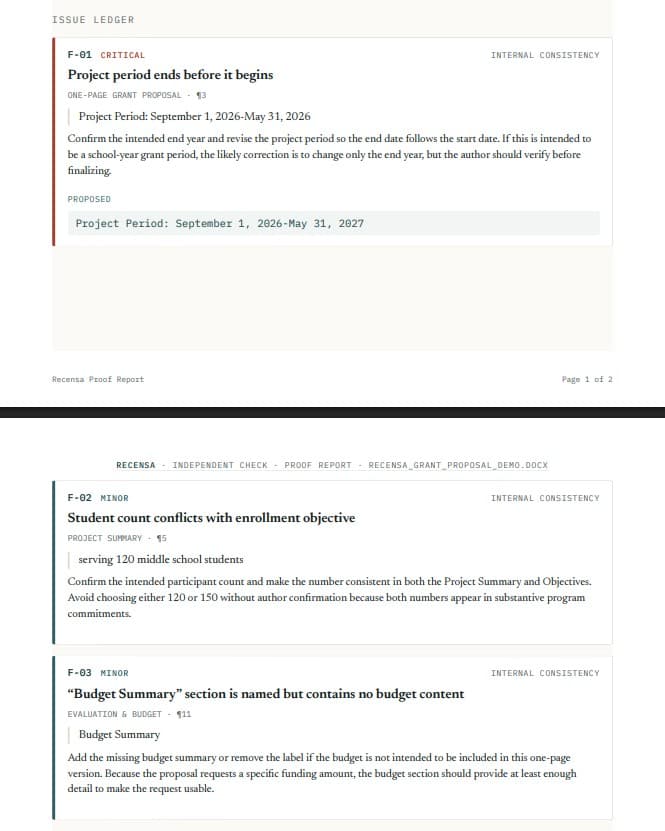
The Issue Ledger: every finding, with its evidence
The exact passage, the calculation, the package item, or the governing rule behind each finding.
- Evidence-bound. If we can't show the basis for a finding, we don't report it.
- Located in your document. Each finding points back to where it came from, so you can judge it in context.
Inside the Proof Report
The record: what ran, and when
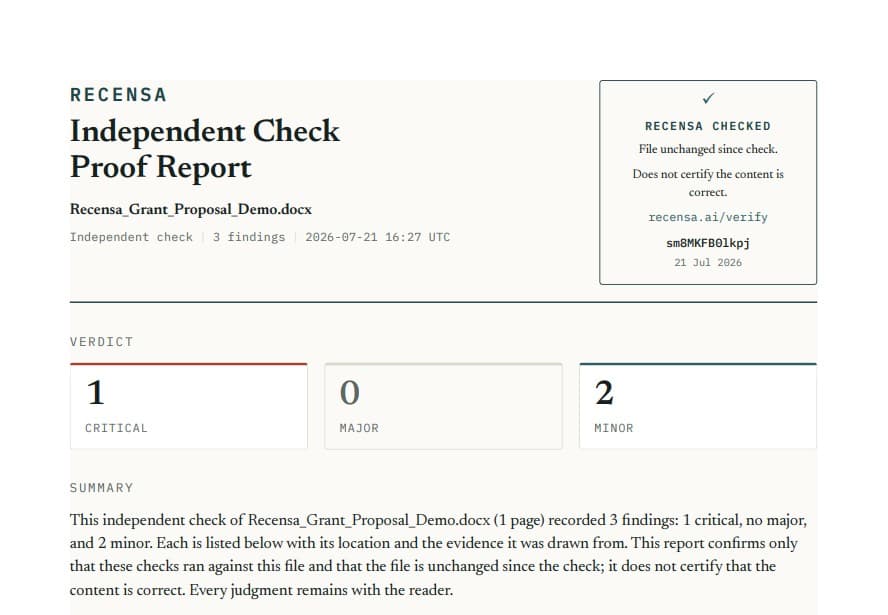
Downloadable. Keepable. Shareable with whoever asked you to check.
- Not a chat transcript. An export-shaped summary of the checks that ran on this file.
- Built for sign-off. Hand it to a client, a counterparty, or a reviewer as the record of the check.
The Recensa Checked mark
Confirms two things: which checks ran, and that the file hasn't changed since. It does not certify that the content is correct — and it says so, on the mark itself. Anyone can verify it at recensa.ai/verify, with no account. What the mark certifies →
Corrections
Fixing what it finds
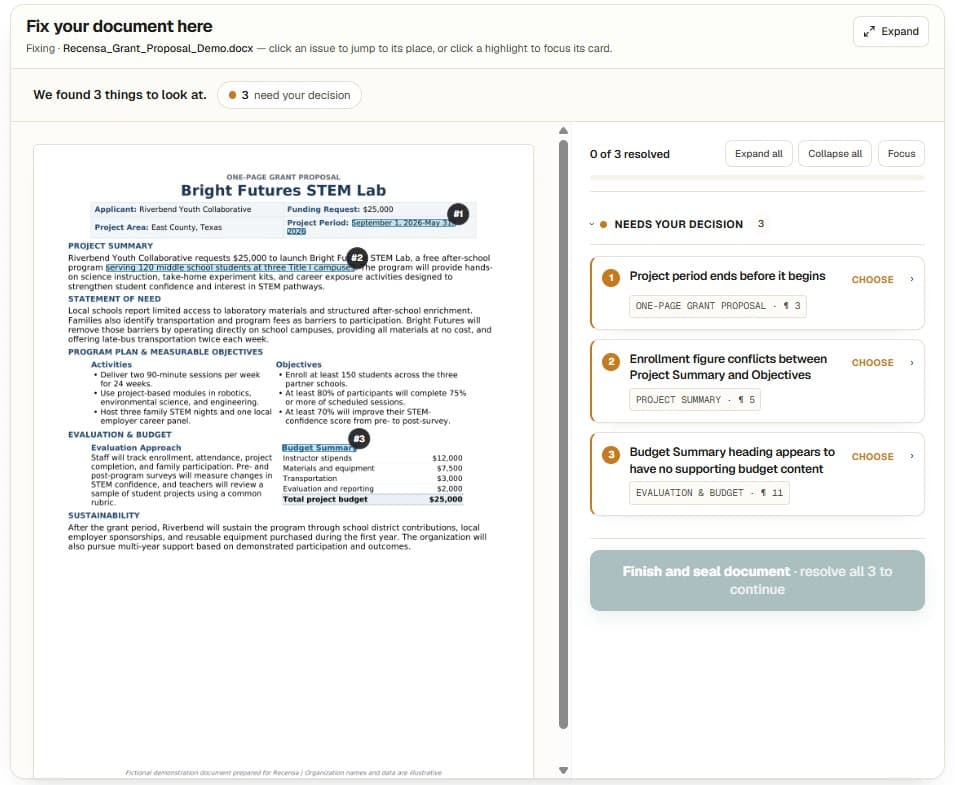
Recensa can apply corrections you approve. Every change is yours — you accept, reject, or type your own. Nothing is rewritten silently, and nothing is changed that you didn't authorize. You make every call; Recensa executes it correctly.
Apply Fixes
You decide. Recensa applies it exactly.
Review each finding, choose what to do, and Recensa applies your decision — preserving formatting, tables, and numbering.
- Nothing silent. No wholesale rewrite. Only the changes you approve, applied precisely.
- Do-not-change locks. Mark passages Recensa must never touch — negotiated language, an agreed clause, a signature block. They stay byte-for-byte identical.
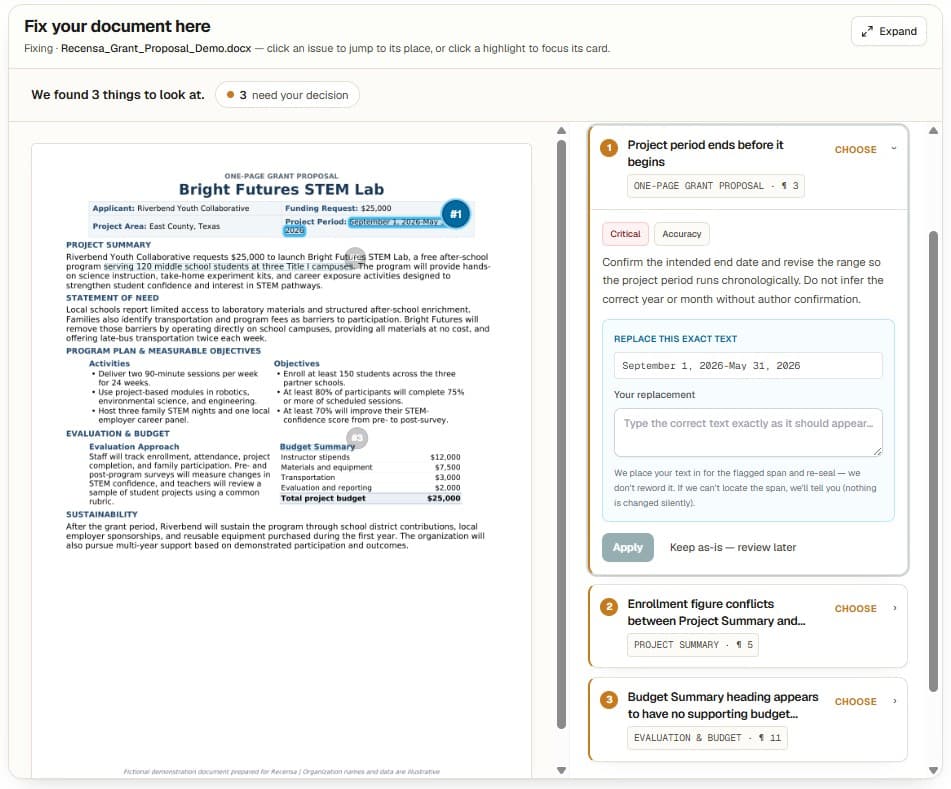
This is the opposite of a rewrite. An assistant that rewrites hands you a new document and leaves you to work out what changed and whether you agree. Recensa keeps your document and applies only the specific corrections you approved, one at a time, so the diff is exactly the set of decisions you made — nothing more. Formatting, tables, numbering, and styles are preserved, because the goal is to fix the finding, not to reflow the file.
Getting documents in
Getting your document in
Recensa works on finished Word (.docx) and PDF files. Upload from your device or import from Google Drive, and for a Source Check, attach the supporting files you want the document checked against. What you get back is downloadable and shareable — nothing is locked inside an account.
Word & PDF
Finished documents, the way you actually send them. Recensa reads the file as delivered, including the structure a portal or a counterparty will see.
Import from Drive
Bring a document straight in from Google Drive instead of downloading and re-uploading it. The check runs on the file you selected.
Supporting files
Attach the prior draft, the term sheet, the solicitation, or the data. A Source Check reads the document against the material you provide.
Where it fits
Documents Recensa checks
Recensa works on finished Word and PDF documents of any kind. It's built for documents where an error is expensive: contracts, proposals, grant applications, agreements, reports, and filings — anything long enough that no one has read the whole thing in one sitting.
Contracts and agreements
NDAs
Real estate
Proposals and RFPs
Grant applications
Long business documents
Academic papers
Anything drafted with AI
Start to finish
How a check works
- 01
Upload
Word or PDF, from your device or a Google Drive import. Add supporting files for a Source Check.
- 02
Choose a check
Internal, Source, or External — how far outside the document Recensa should look.
- 03
Recensa checks
The document is read and re-read, plus deterministic checks: arithmetic recomputed, required items checked against a list, package rules validated mechanically.
- 04
Review the findings
Each one tied to its evidence and located in your document.
- 05
Fix what you choose
Accept, reject, or type your own. Nothing changes that you didn't approve.
- 06
Download
The sealed document and the Proof Report — proof of what ran, and that nothing has changed since.
The boundary
What Recensa does not do
This section is not a disclaimer. It's the product. Recensa is an independent check, and the things it refuses to do are exactly what make its findings worth trusting. Here is where it stops, and why the stopping point is deliberate.
Your data
Your document
Your document is held to run the review, then removed from our systems about 7 days after completion — about 24 hours in sensitive mode. You can delete a job yourself at any time. What remains is a cryptographic fingerprint, a verification record, and report metadata — not the document itself. Your documents are never used to train models.
Processing involves third parties — model providers, hosting, error monitoring. We name every one of them and what they see: subprocessors · AI & your documents.
FAQ
Frequently asked questions
- Does Recensa write or rewrite my document?
- No. Recensa never drafts. It checks a finished document and reports what it finds. It can apply corrections, but only ones you explicitly approve.
- What file types does it accept?
- Word (.docx) and PDF.
- Is it free?
- The Internal Check — your document against itself — is free. Source Checks are paid.
- Does the seal mean my document is correct?
- No. The Recensa Checked mark confirms which checks ran and that the file hasn't changed since. It does not certify that the content is correct. That judgment stays with you, and the mark says so.
- Can someone else verify my document?
- Yes. Every checked document carries a verification ID. Anyone can enter it at recensa.ai/verify — no account needed.
- Do you keep my document?
- No. We keep a cryptographic fingerprint so the seal can be verified later, plus a verification record and report metadata. Not the document.
- How is this different from Grammarly?
- Grammarly checks language. Recensa checks whether the document contradicts itself.
- How is this different from an AI writing assistant?
- An assistant drafts. Recensa checks a finished document — and it never drafted it, which is the whole point.
Explore
Go deeper
Run a free check on a finished document
Upload a Word or PDF file and see what's wrong inside it. The Internal Check is free, and no account is needed to verify the result.